Free · Daily capture
Try editing and hiding private data right here. Capture, crop, annotate and export on the live demo page.
Pro · Advanced workflows
See what Pro makes below. With the extension installed, try every feature on the live demo page.
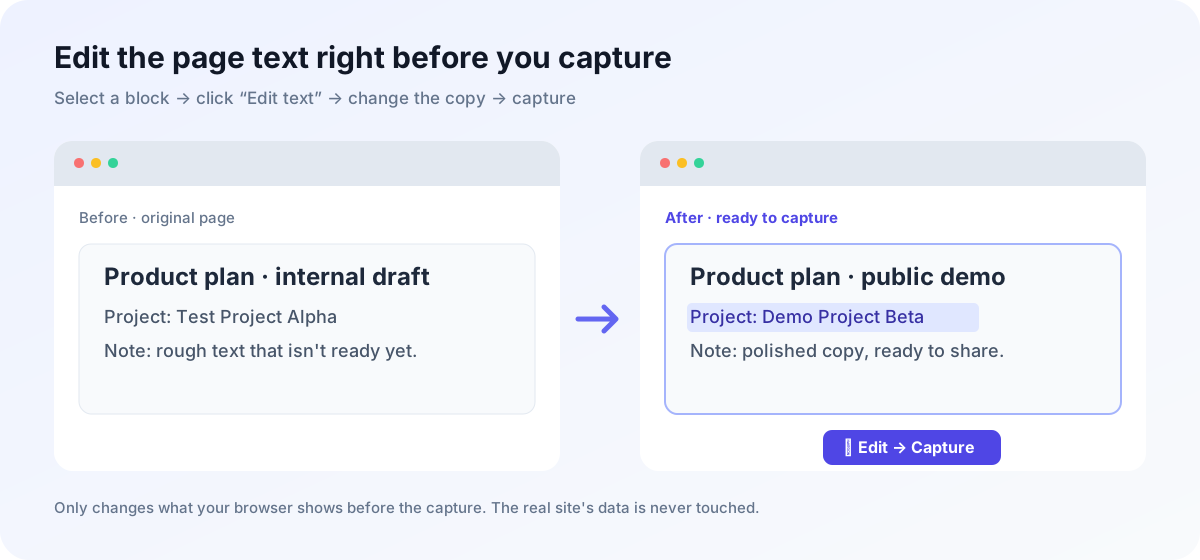
Free · Edit webpage text before capture
Click Edit text, change the sample title or description, then try masking private data. This is a browser-only sample.
Product update · Draft
Replace this draft with wording you are ready to share.
Customer: demo@example.comThe extension can edit selected webpage text before taking a screenshot.
To capture, annotate and export a real page, open the live demo with the extension installed.
Open the live demo →💡 A dedicated companion extension (Shortcut:
Alt + B)
1
Verify Contract Status
2
Click Approve & Export
Enterprise Billing Admin Portal
Merchant API Key:
sk-****************| Customer | Work Email | Phone | Contract Value | Status |
|---|
🛡️ Internal Training & Help Center SOP · Sanitized with SnapCard
🏆 #1 Product of the Day on Product Hunt!
MONTHLY RECURRING
$10,480
▲ +184% MoM
Stripe Live Revenue & Subscriptions
Latest Subscriber: team@vercel-partner.io · Card: 4242 •••• 9912
Monthly Recurring (MRR)
$10,480.00
Active Paid Users
542 (+48)
Webhook Key
sk-live998123abc
Built by @alex_indie · 🌐 snapcard.dev
🤖 为什么宽屏网页直接截图发小红书没人看?
电脑网页通常是 1200px 宽屏排版,如果直接截屏发到手机竖屏(3:4)信息流里,字号会被缩小 60% 以上,读者需要双指放大才能看清。
💡 截图前先排成手机阅读宽度,字号清晰饱满!
📌 @效率工具主理人
左滑看下篇 →
✨ 自动承接上一段落(零劈字切分)
同时,插件会自动计算每个段落与代码块的精确高度,只在段落空白间隙处切分图片,绝不会把任何一行文字从中间劈成两半!
✓ 自动重排为 440px 竖屏大字号
✓ 只在段落之间的空白处切图
✓ 一键打包下载全套 3:4 笔记卡
✓ 只在段落之间的空白处切图
✓ 一键打包下载全套 3:4 笔记卡
📌 @效率工具主理人
全文完 ✨